Domain Lists
Overview
Domain Lists are lists of Top-level Domains (such as “cnn.com”) or full urls (“cnn.com/travel/best-12-pastas-in-tuscany”) that you want to run a private job on. Domain Lists can be uploaded in two different ways - directly, from the “Domain Lists” tab in the Private Jobs section of the application, or by specifying an AWS S3 bucket that will be automatically monitored for new files that you upload.
In both cases, the Sincera application expects the file to be either in the .gz or .csv format, and the url data to be located within the first (“0”) column position.
Parsing Methodology
Regardless of your upload method, the application will parse + clean your uploaded file, to ensure that we generate as many valid results for your Private Job as possible. Parsing includes (but is not limited to)
- Removing UTM parameters
- Removing duplicate URLs
- Removing invalid URLs
Creating a Domain List
Upload a CSV file via the Application
Domain Lists can be uploaded within the Sincera Application by navigating to “Data -> Create Domain List” within the top level menu. The file can be either a .gz or .csv file, and the url data should be located in the first (“0”) column position. The file can be up to 1GB in size.
Setting: Exclude Domains
This allows you to mark top level domains to remove from the domain list.
Setting: Mark Global
This will allow you to set the domain list to “global”, so all entities on Sincera can run Private Jobs against the list. Use with caution.
Setting: Remove Adsystem Domains
This will remove known adsystems and their respective domains from your uploaded list. These URLs are used for advertising, and as such are not actual publishers. These URLs can “pollute” your results, and should be removed if possible.
Setting: Preserve Subdomains
This will treat subdomains (e.g. travel.example.com and autos.example.com ), as unique entries.
Setting: Preserve URL Parameters
Typically, Sincera will remove URL parameters from submissions when testing for uniqueness. As an example, https://example.com?utm_medium=organic would become https://example.com. This setting will instead keep all query parameters intact.
Setting: Contains Instruction Sets
Instruction sets are a specialized, additional column that allows for more granular control over some modules.
Sincera expects your instruction sets to be added to each line of the file, and contain well-formatted JSON such as:
"https://example.com","{""version"":""1.0"",""actions"":[{""click"":{""selector"":""a[href]:not([target='_blank'])"",""limit"":1,""waitAfter"":5}}]}"
This example shows a properly CSV-escaped version of the payload.
Setting: Custom Index
Submitting a URL or Domain List with millions of full URLs, including query parameters, can make for a cumbersome review process when you want to join the results back to your own datasets. In this case, you can use the Custom Index feature. This allows you to submit with two columns - the first column being the Index value, which is alphanumeric and set by you. The second column is the URL you wish to visit.
Upon completion of your Private Job run, Sincera will include the original index values in your results file in your results file.. This is a helpful way to handle redirects or parameter changes.
Viewing Domain Lists
Domain Lists can be viewed by navigating to Data -> All Domain Lists. This will show you all of the Domain Lists that you have uploaded to the Sincera application.
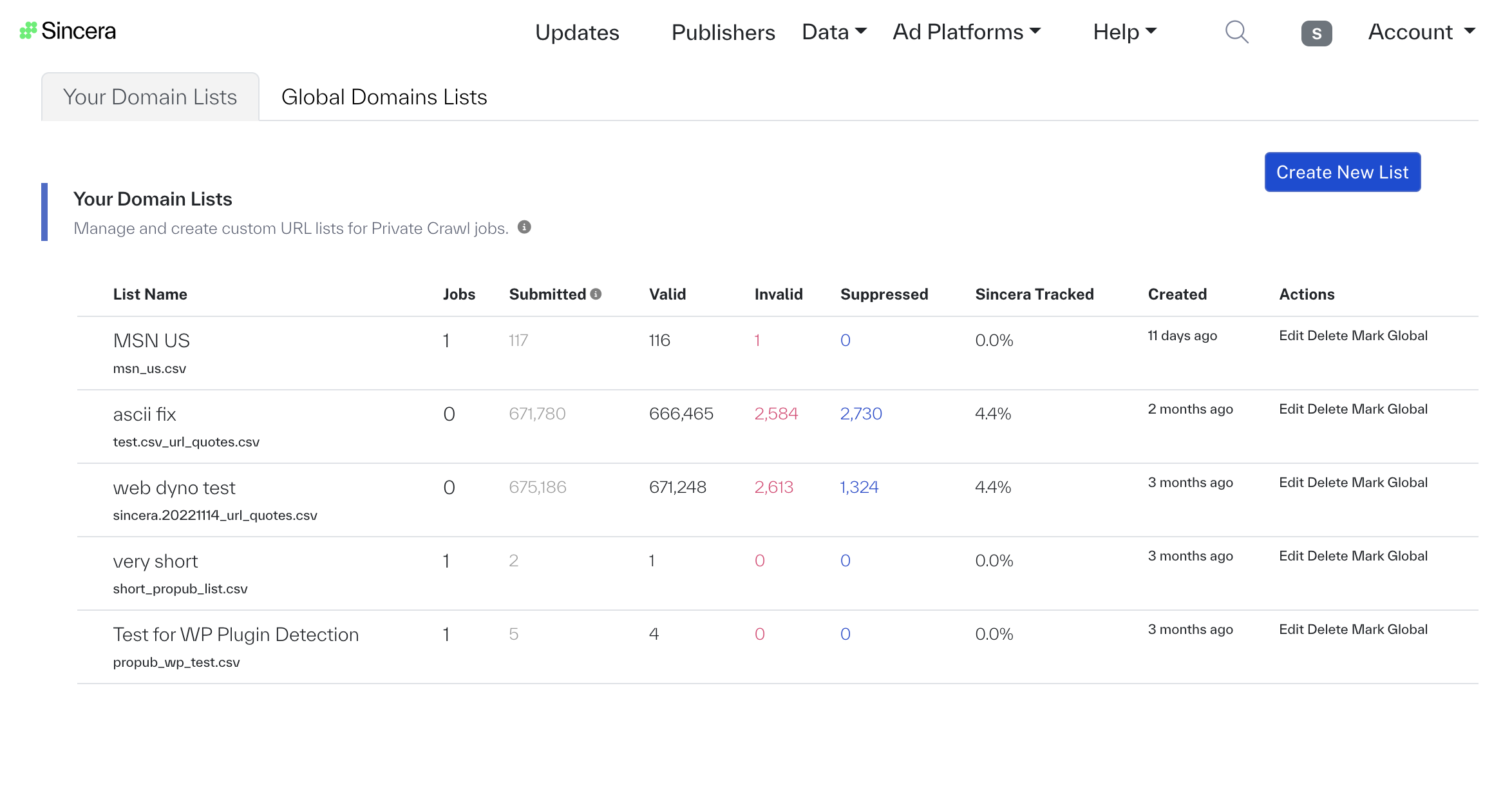
In this table, you can see the number of jobs associated with a Domain List (“Jobs”) as well as other counts.
- Submitted refers to the number of individual URLs (rows) that were discovered in the file.
- Valid is a count of eligible rows for crawling
- Invalid is a count of URLs (rows) that have syntax or foundational errors that cannot be legitimately parsed by a web browser.
- Suppressed is a count of rows that were either ad system domains (and therefore not actually publishers) or were marked as “Exclude” by the user who created the Domain List.