Custom (Private) Jobs
This section outlines all of the elements that have to do with running custom (aka “Private”) jobs on the Sincera application.
Private Job Basics
Types of Private Jobs
There are several types of Private Jobs, each with their own use case. More detail about Private Job Types can be found here.
Job Scheduling
On Demand
This is the default mode of running a Private Job. In this mode, the Private Job will only run when you manually trigger it. This is useful for running a Private Job on a small Domain List, or for running a one-off Private Job that you don’t want to schedule.
Repeat runs of an “On Demand” Private Job are referred to as “batches” and can be viewed at the bottom of the Private Job UI. The “batches” are also available in the “Job History” section of the Private Job UI.
Scheduled
The Scheduled Job option allows you to run a specific job at a regular, set, interval. This could be daily, weekly, monthly, etc. The Scheduled Job option is useful for running a Private Job on a large Domain List.
Automated Monitoring (aka Monitored Repo)
If you are planning to augment your product or service with Sincera private job data, you may want to consider automating the monitoring of your private jobs. Sincera currently supports uploading data to an AWS S3 bucket in Sincera’s account.
Automated Jobs require the following:
- Create a Private Job
- Select the “Automated Monitoring” option in the “Scheduling” Drop Down.
- Ensure that Sincera has configured your AWS account to allow Automated Monitoring and set a custom S3 bucket for your account.
- Upload your Domain List to S3 within the
<job_id>/incomingfolder. (if it’s your first automated job, request a new customer-wide S3 bucket from Sincera) -
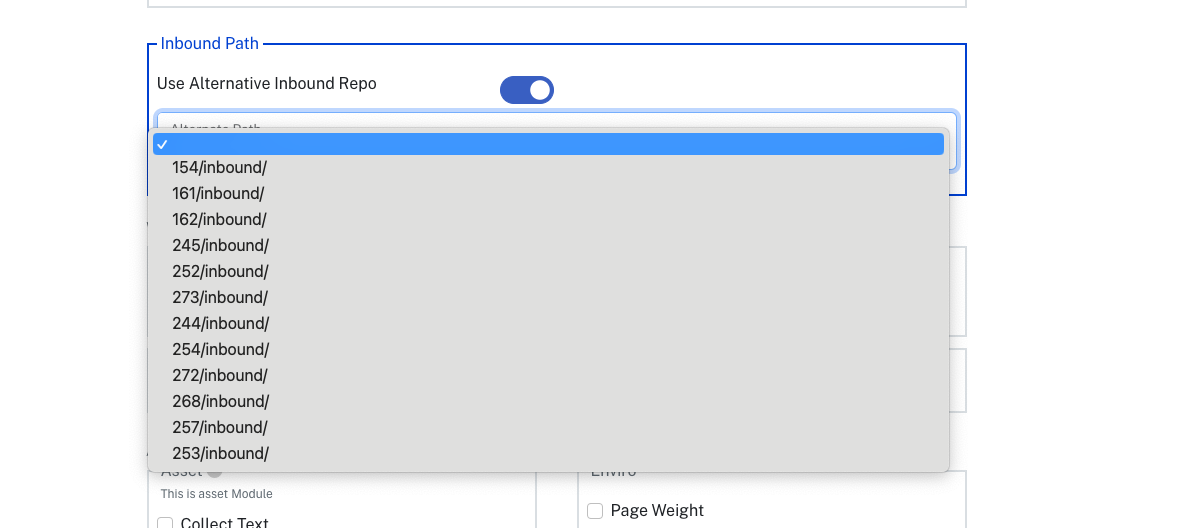
NEW! In our upcoming release, you will be able to designate an Alternate Inbound Repo path:
- As long as your Job is configured to “Active” and the “Automated Monitoring” option is selected, Sincera will automatically poll the S3 bucket every 10 minutes. When a new Domain List .CSV is discovered, Sincera will automatically run the Private Job on the new Domain List.
- Upon job completion, the results will be uploaded to the S3 bucket in the
<job_id>/outgoingfolder. The results will be named with the batch ID and the job ID. The results will be in the format you selected for the job.
Note that jobs that utilize Automated Monitoring will generate “sub jobs” for each Domain List that is uploaded to S3. These sub jobs are referred to as “batches” and can be viewed at the bottom of the Private Job UI. The “batches” are also available in the “Job History” section of the Private Job UI.